
A Better Contractor Website Starts With One Page That Makes It Easy to Call You
Jay installs a contractor lead page and quote calculator on your existing WordPress website for $397. Your business name, your colors, your phone number. Done within 48 hours after payment and details arrive.
Send Jay your website address and trade. He’ll let you know if your site is a good fit.

Is This the Right Fit?
This service works best when three things are true:
- You already have a WordPress website. It doesn’t need to be fancy. It just needs to be live and running WordPress.
- You want a clearer page for visitors. Right now, most people land on your site and leave without calling. A lead page with a quote calculator gives them a reason to pick up the phone.
- You’d rather have someone handle the setup. You’re busy running jobs. Jay handles the installation so you don’t have to figure out plugins, page builders, or calculator configuration.
See How It Works
Jay walks through how a contractor lead page and quote calculator help your existing website turn more visitors into calls.
Can’t watch right now? Open the video on YouTube, or just call Jay at 608-322-4081 and he’ll explain it.
What Your Customers Actually See
When a homeowner finds your website, they’re trying to figure out three things: do you handle their type of project, do you work in their area, and how much is it going to cost?
The lead page answers those questions without making the visitor dig through your entire site. They see:
- Your business name, trade, and service area right at the top
- A quote calculator that gives a ballpark estimate based on their project details
- Your phone number in a big, obvious call button they can tap from their phone
- Relevant information about your services, presented in a clean mobile layout
The calculator uses your configured assumptions to produce a rough estimate. It’s not a final price and it’s not a binding contract. It’s a starting point that gives the visitor enough confidence to pick up the phone and talk about their actual project.
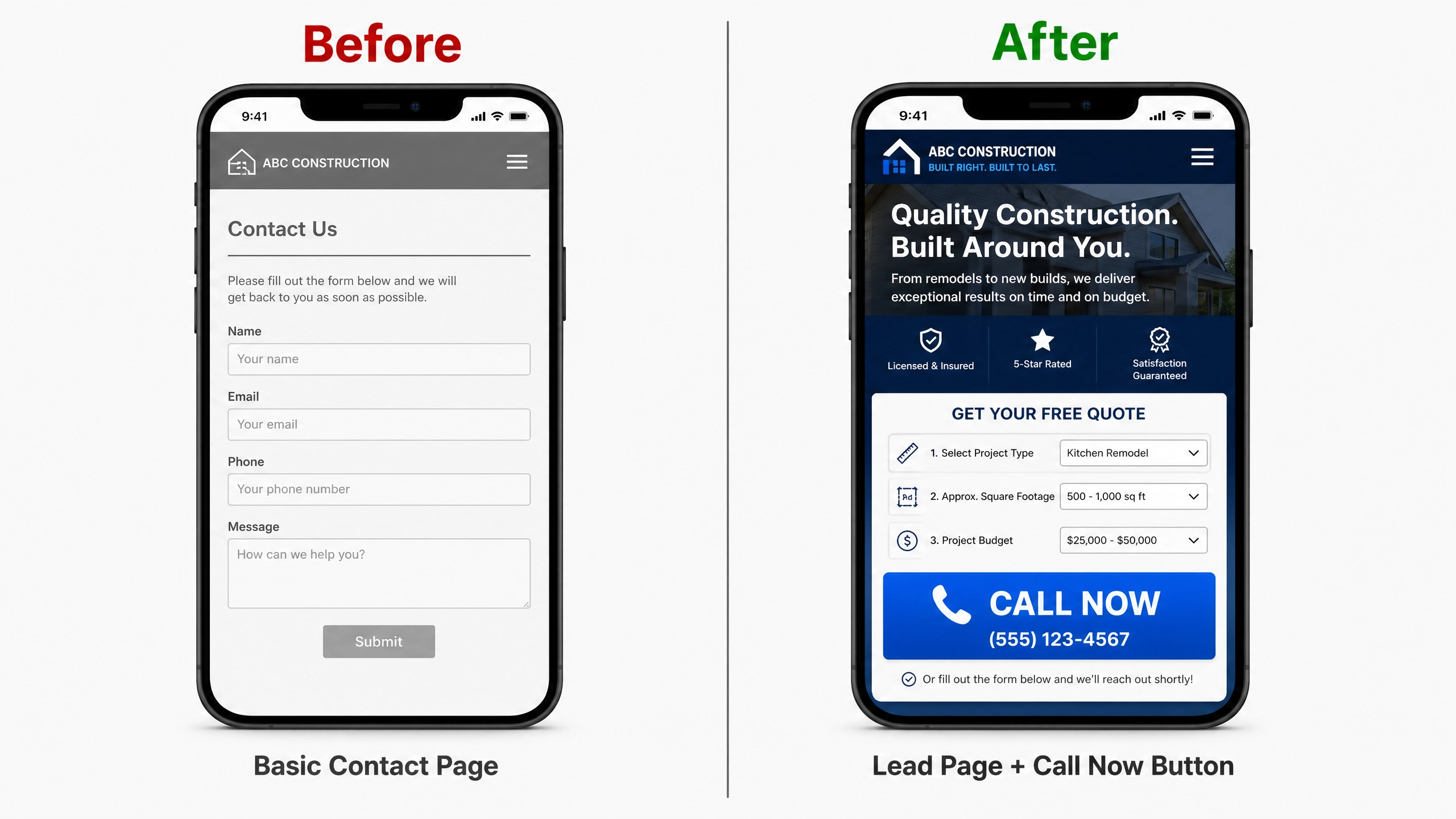
Left: a typical contractor contact page. Right: a lead page with calculator and call button.
See It Working on Real Demo Pages
These are live demos showing the lead page and calculator for different trades. They’re built on WordPress and they’re the same structure Jay installs on your site.
Roofing Lead Page
Full roofing lead page with a quote calculator that handles materials, roof pitch, complexity, and location. Includes a mobile call button, services section, and homeowner FAQ.
View Roofing DemoPlumbing Lead Page
Plumbing version with a quote calculator configured for common plumbing services. Shows how the same structure adapts to a different trade with different pricing variables.
View Plumbing DemoThese demos use placeholder business names. Your installed page uses your actual business details, colors, and phone number. A remodeling calculator example is also available.
What Jay Handles for $397
Here’s exactly what’s included in the installation:
- One contractor lead page installed on your existing WordPress site
- A built-in quote calculator configured for your trade
- Your business name, phone number, and service area displayed prominently
- Basic color matching to your existing website or brand
- Mobile-friendly layout that works on phones and tablets
- A large, visible call button so visitors can reach you with one tap
- One basic revision after the initial setup
What You Provide
Jay needs a few things from you to get started:
- Temporary WordPress admin access (you can change the password after installation)
- Your business name, trade, service area, and phone number
- Any specific services or pricing assumptions for the calculator
- Your preferred colors or a link to your current branding
How the Quote Calculator Fits Your Business
The calculator is built around configurable assumptions that you control. For a roofer, that might mean setting base prices by material type, adjusting for roof pitch, and factoring in location. For a plumber, it might be based on service type and job complexity.
You decide which numbers go in. Jay configures the calculator with your pricing logic during installation.
Here’s what the calculator does and doesn’t do:
- It gives homeowners a ballpark estimate based on selections they make (project type, size, options)
- It shows a clear next step to contact your business for an actual quote
- It works on mobile devices where most of your visitors are browsing
- The assumptions and price ranges are yours to set and adjust
The calculator result is not a final quote. It’s a starting point that gives the visitor enough information to decide whether it’s worth calling you. That’s the goal: get the phone to ring with someone who already has a rough idea of the cost.
One thing to be clear about: the calculator provides estimates based on the assumptions you configure. It doesn’t pull live material pricing from suppliers, and it doesn’t connect to a CRM or send automated emails unless that’s been specifically set up as part of a different arrangement.
Want to see a working calculator? Try the roofing live demo or the plumbing calculator demo to see how visitors interact with the tool on a real page.
How the Installation Works
The process is straightforward. There’s no long onboarding, no recurring subscription, and no multi-week project timeline.
- Call or text Jay, or pay directly. Send your website address and trade, or go ahead and pay $397 with PayPal if you’re ready. Either way works.
- Suitability check. Jay reviews your site to confirm it’s a standard WordPress installation and a good fit for the service. If it’s not suitable, you get a full refund before any work begins.
- Send your business details. Your trade, service area, phone number, pricing assumptions for the calculator, and temporary WordPress admin access.
- Jay builds and installs the page. The lead page and calculator go live on your site, matched to your business details and colors.
- Review and one revision. You check the installed page. If something needs adjusting, Jay handles one basic revision.
The 48-hour installation clock starts after payment, WordPress access, and business details all arrive. The timeline depends on you having those ready.
For temporary WordPress access: create a temporary admin account for Jay, or change your password temporarily. You can update it as soon as the installation is complete. Don’t send passwords in plain text over email if you can avoid it.
$397
One-time payment. No monthly fees. No subscription.
What You Get
- One contractor lead page on your WordPress site
- Built-in quote calculator for your trade
- Your business name, colors, phone number, and service area
- Mobile-friendly layout with a visible call button
- One basic revision
- Installation within 48 hours (after payment, access, and details arrive)
Not ready to pay yet? That’s fine.
If your site turns out to be unsuitable for this service, you get a full refund before work begins.
When You Might Need a Different Quote
The $397 service covers one lead page with a calculator on an existing WordPress site. Some situations fall outside that scope:
- Full website rebuild. If you need an entirely new site with multiple pages, navigation, and content throughout, that’s a larger project with different pricing.
- Non-WordPress platforms. If your site runs on Wix, Squarespace, Shopify, or another platform, Jay needs to review whether the installation is feasible. Call or text first.
- Complex integrations. CRM connections, automated email sequences, payment processing on the calculator, or multi-step intake forms go beyond the base installation.
- Multiple pages. The $397 covers one lead page. Additional pages or a second calculator are separate work.
- Ongoing services. SEO management, ad campaigns, hosting, domain registration, and monthly maintenance are not included.
None of this means Jay can’t help. It just means the scope and price are different. Call or text to discuss what you need.
Common Questions
Can someone add a quote calculator to my existing WordPress website?
Yes. That’s what this service does. Jay installs a quote calculator directly on your current WordPress site as part of a new lead page. You don’t need to switch platforms, buy a new theme, or learn any plugins. The calculator is configured with your trade’s pricing assumptions and installed alongside a lead page that shows your business details, services, and a call button. The whole thing is done for you within 48 hours after payment, access, and details are in hand.
What exactly does the $397 installation include?
One contractor lead page installed on your existing WordPress site, a built-in quote calculator configured for your trade, your business name and phone number displayed prominently, basic color matching, a mobile-friendly layout with a call button, and one basic revision. The installation happens within 48 hours after Jay has your payment, temporary WordPress access, and business details.
Do I need a whole new website?
No. This service adds one page to your existing WordPress site. Your other pages, your menu, your domain, and your hosting all stay the same. Think of it as adding a new room to a house, not tearing down the house and starting over. If you do need a full rebuild, that’s a separate conversation with different pricing.
Can the page use my business name, colors, and phone number?
Absolutely. The installed page uses your business name, your phone number, your service area, and colors that match your existing branding. Jay asks for these details before the installation starts. If you have a logo or specific brand guidelines, send those along and he’ll match the page to them.
Can it be adapted for my specific trade?
Yes. The lead page and calculator structure works for roofing, plumbing, HVAC, electrical, remodeling, painting, concrete, fencing, landscaping, and most other residential contractor trades. The calculator fields, pricing assumptions, and service descriptions are customized to match your actual business. Check the roofing demo and plumbing demo to see how the same structure looks for different trades.
How are the calculator’s prices and assumptions chosen?
You choose them. Before installation, Jay asks you for the pricing assumptions that make sense for your business: base prices, multipliers for project size or complexity, material options, and anything else that affects your estimates. These numbers are configurable, so you can update them later if your costs change. The calculator doesn’t pull live pricing from suppliers or external databases. It uses the fixed assumptions you provide.
Is the calculator result a final quote?
No. The calculator gives homeowners a ballpark estimate based on the selections they make and the assumptions you’ve configured. It’s a starting point, not a binding contract. The idea is to give the visitor enough confidence in the price range to call you and discuss their specific project. You still provide the real quote after talking to the customer and reviewing the actual job details.
Does the calculator collect customer contact information?
The base installation focuses on getting visitors to call or text you directly. The calculator provides an estimate, then shows your phone number and a clear call button as the next step. If you need a form that collects name, email, and phone number before showing the estimate, that’s something to discuss with Jay separately, as it may involve additional setup depending on where those leads should go.
Can I send Google, Bing, or Facebook ad traffic to the installed page?
Yes. The lead page works as a landing page for paid traffic. It’s designed to present your services clearly and give visitors an obvious way to contact you, which is exactly what ad platforms look for in a landing page. You can point your Google Ads, Bing Ads, or Facebook campaign URLs directly to the installed page on your site. The service doesn’t include setting up or managing those campaigns, but the page is ready to receive that traffic.
Does this include SEO, traffic, or ad management?
No. This is a page installation service, not an ongoing marketing package. Jay builds and installs the page, but driving traffic to it is your responsibility. You can share the page link on social media, point ads at it, or let it pick up organic search traffic over time. If you want help with SEO or advertising, that’s a separate conversation.
What access and business details does Jay need?
Jay needs temporary WordPress admin access to install the page. The easiest approach is to create a temporary admin account or change your password for the duration of the installation. You can update the password as soon as the work is done. Beyond that, Jay needs your business name, trade, service area, phone number, any pricing assumptions for the calculator, and your color preferences or a link to your current site for reference.
When does the 48-hour installation timeline start?
The clock starts when three things are in place: payment, temporary WordPress admin access, and your business details. If you pay today but don’t send your details until Thursday, the 48 hours starts Thursday. Jay can’t build the page without your information and access to your site.
What if my website uses Wix, Squarespace, or another platform?
The $397 service is designed for WordPress sites. If your site runs on a different platform, Jay needs to review whether the installation is feasible and what adjustments might be needed. Some platforms have restrictions that make this type of page difficult or impossible to install the same way. Call or text Jay with your website address and he’ll let you know what’s possible.
What ongoing costs come with my existing website?
This service doesn’t change your existing hosting, domain, or other website costs. Those stay the same. Jay doesn’t host your site, register your domain, or charge monthly fees. The $397 is a one-time payment for the installation. Your regular hosting provider, domain registrar, and any plugins you already use continue as they were before.
How do payment, the suitability review, and the revision work?
You can pay $397 through PayPal before or after talking to Jay. If you’d rather confirm suitability first, call or text Jay with your website address and trade. He’ll review your site and let you know if it’s a good fit. If it’s not suitable, you get a full refund before any work begins. After the installation, you review the page and can request one basic revision. A basic revision means adjusting text, colors, or layout within the existing structure, not adding new features or redesigning the page from scratch.
Ready to Upgrade Your Website?
Text or call Jay with your website address and trade. He’ll take a look and let you know if your site is a good fit for the $397 installation.
Looking for free tools first? Browse the free contractor tools available on InstantSalesFunnels.com.
608-322-4081


